More Swift – A minor refactor

In my earlier I post I talked about not being very sure that a method I wrote for one of the Stanford iOS Programming course assignments was really embracing Swift as a language. I then posted about using Swift’s unit test framework that would make any refactoring easier and better.

And so on to the refactoring…

Well, with a fresh day came a fresh eye, and there was not too much I could really do to make the method more Swift than C/C++. I ended up mainly folding some let statements into inline expressions. Not exactly hard, but when all was completed I think the code is more or less as tight as it could be and still easily readable – opinions to the contrary are very welcome.

Continue reading

Using Swift’s Unit Test Framework

In an earlier blog post I wrote about my solution to one of the homework assignments for Stanford University’s iOS programming course. My conclusion was that, while the code worked, it seemed a little bit too C-like and not really embracing some of the elegance of the Swift programming language.

My intention is to rewrite the code and see if I can get it looking somewhat more Swifty. But of course in doing that I don’t want to break it – there’s a lot of different cases the CalculatorBrain has to handle. This is a classic scenario that can be solved using automated unit testing.

When you create a new application project in XCode, as well as the main build target you get given a test target with boilerplate code for using XCode’s unit testing framework. It is simple to use – just add new functions to the test class, and use XCTAsserts to ensure the right results.

Continue reading

Programming in Swift – perhaps badly

I have been periodically dabbling in learning Apple’s relatively new Swift programming language. Despite many years of experience in a number of languages including C, C++, C# and Objective-C – yep, that’s a lot of C’s! – my primary reasons for wanting to learn Swift is mental exercise and general interest. My day job these days involves very little programming, but I still consider myself a software developer at heart despite moving heavily into the management side of things. So it is good to keep current and familiar with later technologies. And a further reason for choosing Swift is my interest in developing mobile applications, and Swift looks to be the future of iOS development.

My primary source for learning has been the excellent free Stanford University course CS193P: Developing iOS Apps with Swift, presented by the hugely engaging Paul Hegarty. This course is available for free via iTunesU as a series of videos, slides, and practical exercises. I cannot recommend it enough.

This article is about the homework task of extending the Calculator demo: specifically adding a recursive description method to the CalculatorBrain object to present a readable and mathematically correct text description of the contents of the calculator’s operation stack.

The code snippet below is my implementation. The public getter for the description property contains a loop to solve the formatted output of multiple separate expressions, each comma separated, and is pretty straightforward:


    var description: String {
        get {
            var descriptionText = ""
            var (desc,remainingOps) = formatDescription(opStack)
            descriptionText = desc!
            while remainingOps.count > 0 {
                // Comma separate any following complete expressions
                let (desc1,remainingOps1) = formatDescription(remainingOps)
                if desc1 != nil {
                    descriptionText = desc1! + "," + descriptionText
                }
                remainingOps = remainingOps1
            }
            return descriptionText
        }
    }
    

The guts of the solution is in the recursive formatDescription method. It works for the test cases mentioned in the assignment, for example, an operation stack entered in this order:

3 <enter> 5 <enter> 4 + +

gets displayed as:

3+(5+4)

It also handles error conditions such as missing operands being displayed as “?”. So it works.

 
    // Recursive function to format description string
    private func formatDescription(ops: [Op]) -> (desc: String?, remainingOps: [Op]) {
        if !ops.isEmpty {
            var remainingOps = ops
            let op = remainingOps.removeLast()
            switch op {
            case .Operand(let operand):
                return ("\(operand)", remainingOps)
            case .UnaryOperation(let operation,_):
                let (op1Text, remainingOps1) = formatDescription(remainingOps)
                let op1ActualText = op1Text ?? "?"
                let returnText = "\(operation)(\(op1ActualText))"
                return (returnText, remainingOps1)
            case .BinaryOperation(let operation,_):
                let (op1Text, remainingOps1) = formatDescription(remainingOps)
                let (op2Text, remainingOps2) = formatDescription(remainingOps1)
                let op1TextActual = op1Text ?? "?"
                let op2TextActual = op2Text ?? "?"
                let returnText = "\(op2TextActual) \(operation) \(op1TextActual)"
                return (returnText, remainingOps2)
            case .Variable(let variable):
                return (variable, remainingOps)
            case .Constant(let constant):
                return (constant, remainingOps)
            }
        }
        return (nil, ops)
    }

This brings me to the point of this blog post – I think I’m missing something. The formatDescription method does not feel very elegant. Swift has a fantastic type inference engine, and features like optional chaining, which I feel my solution does not take advantage of. You could say it is a little too C or C++ like. All those “let” statements seem overkill.

What do you think? Is there a better more elegant solution?

AppInventor – Preserving Button State When Switching Screens

This is the third tutorial note to be published from a collection I created in support of a schools IT programme. It covers preserving state between screens, refactoring of code, and passing of values between screens. It is rather a long article as it goes into some detail.

As a reminder, the notes here address one or more specific problems that the students had while writing their own application.

Problem Statement

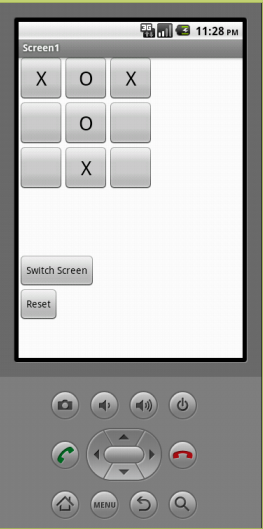
The app has some buttons to represent a Tic-Tac-Toe game – each button in a 3×3 array can show nothing, a X or a 0. Each tap of the button changes the state to the next one. (This game is also known as Noughts and Crosses.)

It looks something like this:

aibuttonstate1

The problem to solve is that the app needs to remember the state of the buttons when switching to a different screen and then coming back.

Continue reading

Formatting code in WordPress

What a pain in the rear! WordPress appears nice as a blogging tool, but my attempts to format some code snippets was painful beyond belief.

Every time I pasted some code in and surrounded it with the code tags, the generated HTML had extra paragraph markers and line breaks, and screwed up the position of the closing code marker.

Even a search for plugins did not cure things. I installed one or two “code formatting” plugins that made things a little better, but still required a lot of post-paste editing of code to get anything like presentable.

It turns out that the Rich Text Editor in WordPress 2 is to blame – it completely messes up. So my advice is to disable this from your user profile.

The thing that rankles is that the rich editor is enabled by default. I did not even know it was optional until I did a Google on code formatting in WordPress. It all just seemed much much harder than it should.

Anyway, hopefully this snippet will save others the problem in the future.

Useful CSV reader

To aid my unit testing I needed to populate a database with a load of test data. This data needs to be generated by some of the less technical guys on the project and so exporting CSV (Comma Separated Values) files from Excel seemed a sensible approach. So I then cast around for any existing code that would save me having to write a robust CSV parser. The search turned up this on CodeProject:

LumenWorks.Framework

The neat thing about it is that you can get field values either by index position or column name, assuming you put column headers in your file. The column name feature really helps out with maintainance of the test data as we evolve and vary the schema slightly – we can insert columns with no worries about upsetting existing reader code.
It’s easy to use and install in your own project, and the CodeProject article describes the basic usage pattern. At the moment it is just linked in to the unit test framework, but is so useful I will probably make it a part of the core application libary to facilitate importing data from customers as we anticipate some of our customers could have thousands of records to import when they move to our system.